 |
| |
| |
| |

 A publication of the Information Development department
Vol 3, Issue 4
October 2003
 Editors' message Editors' messageIn this issue
Plans are now underway for the upcoming Open Text, FirstClass division LiveLinkUp 2003 conference in Orlando, Florida from November 3-6. We think this can be a valuable experience for many administrators and so we're including a description of the FirstClass sessions in this issue plus letting you know how attending can get you some free software.
A great way to learn, get new ideas, and increase student and teacher involvement is by sharing information. Your responses to our newsletter surveys have proven that you want to see how other administrators have maximized their sites using FirstClass technology. To answer your demand for customer case studies, this issue showcases the work that Jim Hendry, FirstClass administrator and teacher, has done with the Lester B. Pearson School Board. He has taken his site to a new level by implementing many FirstClass features to the fullest. We know you will enjoy some of Jim's ideas and, possibly, incorporate them into your own sites.
Opportunity for more information
Sales and Marketing promotions are released on a regular basis. The Sales Newsletter is geared to bringing you information on product updates, promotions, and marketing events. This newsletter will be released on a quarterly basis starting November 2003.
If you are interested in receiving the Sales Newsletter please email the following information to InfoForSales@firstclass.com:
• contact information
• server serial number
• version of FirstClass you are using.
We do not share or sell contact information with any organizations outside of Open Text.
Housekeeping
We like to keep our mail lists as up to date as possible. If your email changes, please unsubscribe your old account and subscribe your new account, as per the procedures in the Subscribing/Unsubscribing section.
Enjoy this issue.
Editors
Annette Ferron
Ann Schwartz
 Contents Contents LiveLinkUp Conference: Internal FirstClass Sessions Sneak PeekCase study: Lester B. Pearson School Board LiveLinkUp Conference: Internal FirstClass Sessions Sneak PeekCase study: Lester B. Pearson School Board Frequently asked questions Frequently asked questions As an administrator, I can use the Mail Rules feature, but why can't my users? How do I set the mail rules for a user? How do I set up my mail rules to reject "hot", but accept "photo"? As an administrator, I can use the Mail Rules feature, but why can't my users? How do I set the mail rules for a user? How do I set up my mail rules to reject "hot", but accept "photo"? TUI Tech tip TUI Tech tipCalling restrictions
 Tools ToolsNew server backup script
 In future issues... In future issues...What to look for in future issues of the FirstClass Newsletter
 We still want to hear from you We still want to hear from youFeedback? Questions? Topic ideas?
 Contact information Contact information Resources ResourcesNew training courses and where to find documentation
 Archives ArchivesWhere to find previous newsletter issues
 Subscribing/Unsubscribing Subscribing/UnsubscribingSubscribe other members of your organization
 Copyright noticeLiveLinkUp Conference: Internal FirstClass Sessions Sneak Peek Copyright noticeLiveLinkUp Conference: Internal FirstClass Sessions Sneak PeekWe'd like to remind you about the special FirstClass User Group conference track being held in conjunction with Open Text's LiveLinkUp 2003 in Orlando, Florida from November 3-6.
The FirstClass sessions provide an opportunity for both experienced and new FirstClass customers to
• learn and share information
• engage in detailed discussions about the future of FirstClass
• successfully implement new features and provide innovative solutions.
This year we will discuss our new direction in eLearning and how FirstClass will provide powerful and easy to implement solutions for this important market. Also, we will highlight some internal and third party applications that can provide real benefits to users and administrators. And, of course, we will be discussing in some detail the FirstClass product direction and getting feedback directly from you, our customers.
As a special offer, those who sign up for the FirstClass Server optimization: Reading the runes session will receive a free beta copy of our new server log analyser and will be registered for a free upgrade to the shipping version (a $995.00 USD value). We expect to release this tool early next year. The alpha version of this tool was described in The FirstClass Newsletter, Volume 2 Supplemental and generated a lot of interest. This is your chance to get it for free.
We look forward to seeing you at this event. Don't forget to visit us at our demo stations in the exhibitor hall and spend some time discussing your experiences with us and your peers. The conference kick-off is the evening of November 4th with the FirstClass user sessions November 5th and 6th. We are also providing FirstClass training on November 3rd and 4th. As FirstClass customers, this conference is available to you for $1,200 USD (regular price $1,700 USD). Don't miss this exciting opportunity.
If you are interested in attending please contact your account representative
or email us at: LLU_Attendees@firstclass.com
Session are now being developed and we currently plan to cover the following topics:
The future of FirstClass and FirstClass 8.0
Scott Welch, Chief Evangelist, FirstClass Division
Scott Welch, FirstClass co-founder, architect, and evangelist, will provide a sneak look at the developments planned for FirstClass 8.0 and provide and discuss the vision which will take us through the next few years. Attend this session to learn how the enhancements in upcoming releases of FirstClass will incorporate technology such as presence management, unified communications, real-time collaboration and eLearning. A sneak peek will provide attendees with a glimpse of new features such as the new document editor (table manager), new web interface (browser plugin), enhanced TUI, and great enhancements to instant messaging and online presence management, to name a few.
FirstClass Internet Services: Enhanced security and SPAM management
Terry Whyte, Development Manager, FirstClass Division
As our Internet Services reaches a new level of maturity, additional focus is being placed on SPAM management and email security. This is an opportunity to ask the experts how you can use FirstClass to increase the information security at your organization and hear about what is coming in FirstClass 8.0. We will also provide the audience with a sneak preview of FCRAD (FirstClass Rapid Application Development) via the web, allowing access to a broad range of FCRAD applications directly from the web browser. This capability will open up a whole new world for third party tools and custom extensions for FirstClass.
FirstClass Server optimization: Reading the runes
Jeff Parker, Director of Application Development, FirstClass Division
This is your opportunity to learn about the often mysterious world of server optimization with tips and tricks that have rarely before been revealed. Learn to take the pulse of your servers, what you can do yourself, and when to call support.
FirstClass: eLearning and curriculum management
Cameron Forlong, eLearning Evangelist and Product Manager, FirstClass Division
FirstClass allows customers to transform their collaborative server into a complete virtual education enterprise. Currently a new initiative is under development that will greatly increase our presence in the eLearning market and provide enhanced functionality and ease of use.
FirstClass Unified Communications
Senior Developer, FirstClass Division
Learn how FirstClass Voice Services can benefit your organization by integrating your communications and how voice services can be added to FirstClass to further the goals of both enterprise and educational organizations. See the power of Unified Communications demonstrated and hear about what is coming with FirstClass 8.0 and beyond.
Round table: FirstClass strategic direction
John Myers, Vice President and General Manager (and team), FirstClass Division
This is your chance to impact the future of FirstClass by sharing your knowledge and experiences. A panel of FirstClass architects, founders and senior managers will present an outline of the current plans for the future of FirstClass. The conversation will be driven by questions and comments from the audience and is a great opportunity to meet and interact with FirstClass experts. The outputs from this session will influence the planning of FirstClass 8.x and beyond. It is highly recommended that FirstClass users and administrators, as well as those interested in implementing FirstClass in the future, attend this session.
Getting more from FirstClass: A school district example
Gary Falcon, President, Aptiris
Learn how Pickens County Schools uses FirstClass to comply with state requirements to track professional development credits for teaching staff. Using Aptiris course registration application, Pickens County integrates course search, registration and credit-tracking tools with daily communications functions. Implementing FirstClass-based applications means less time training, installing and managing separate systems.
See how this add-on application helps Pickens County manage a dynamic online course catalog simply and easily. This comprehensive solution is part of a new suite of education applications from Aptiris, helping districts take advantage of their existing investment in FirstClass to improve adoption and lower overall training and deployment costs.
Designing and managing unified digital environments in FirstClass
Bill Seretta, President, WhatIf Networks
This session will demonstrate the many features of FirstClass with examples in higher education and local government. This will include web publishing, authentication, collaboration, scalability and direct links to databases. These features allow for the deployment of a complete unified digital environment that includes a web site, virtual classroom, virtual campus, virtual library and student management system. The web publishing capacity of FirstClass has also allowed Bill Seretta to develop Virtual Town Hall, which enables local governments to create easy to use web publishing and management tools. Cities and towns can now maintain their web sites without the need of technical staff.
Extending the capabilities of FirstClass
Stewart Lynch, Director of Technology and IS, Richmond School District
A presentation of some high value FirstClass add-ons including the Home Page Construction Kit for both Mac OS and Windows. A wide variety of RAD applications will also be discussed, with a focus on easing the administrative burden by distributing various security functions to non-administrators.
Case Study Lester B. Pearson School Board introduces FirstClass to their teaching community
Jim Hendry is the FirstClass administrator for the Lester B. Pearson School Board (LBPSB). Recently, he visited our offices and gave us a peek at how he has turned his school district into an exciting FirstClass site.
We wanted to share some of his innovations with you, so this issue provides background information on the LBPSB, gives an overview of the installation and users, and discusses how he got buy-in from teachers. It also discusses his use of Voice Services and his feelings about security.
Background
Two years ago, LBPSB was in the process of amalgamating six school boards into one. Originally, each school board was isolated in its own building, with its own unique viewpoint on how communications should be handled. The director-general of LBPSB, Catherine Prokosh, was looking for a cost-effective and feature-rich corporate system to bring the boards together and enable them to enhance communications and the collaboration process among their faculty, students, and community.
During the search, Catherine attended an ERDI (Education Research and Development Institutes) conference where Stewart Lynch presented FirstClass. Impressed with the collaboration and unified messaging capabilities of FirstClass, she invited some directors of LBPSB, one of whom was Jim Hendry, to attend the FirstClass conference in Las Vegas. Jim "got excited talking a lot about what FirstClass could do." That conference was a turning point for Jim, and he ultimately became the FirstClass administrator for LBPSB.
Why did LBPSB finally choose FirstClass as its solution? Jim responds, "It overshadowed the other solutions by leaps and bounds."
Although FirstClass was originally selected as a corporate system, its educational benefits, in terms of features, functionality, communications, collaboration, cost, and especially security, were soon realized. Jim says, "FirstClass helped to improve communications with the community and enrich the classroom experience."
Installation and users
Jim says, "Installation and setup for FirstClass was simple and it was well received by faculty, who found it easy to use."
The total number of users to date on the LBPSB system is:
• 1500 administrative users
• 2314 teachers
• 2000 students
• 300 vocational students (adult students)
• 60 libraries
• 150 integration aids (for special needs children)
• 30 spiritual animators (moral and religious guidance).
The basic FirstClass structure and Voice Services were introduced at the beginning. Web pages and "communities" (conferences created for specific discussions or topics) came in at an ever-increasing pace.
LBPSB currently runs two FirstClass servers. In order for the community to grow, Jim will soon bring the two servers together into one server. At first, LBPSB decided that, to maintain data security and server stability, it was necessary to keep two separate servers, one for the corporate entity and the other for the pedagogical entity. The result, though, was the equivalent of the Berlin Wall. They connected the servers through a gateway, but the "connection" between people was not there. No shared calendars or conferences, no history; while teachers and students worked together, the principal remained outside the community.
LBPSB now realizes that this was the wrong decision. The obvious answer was, in Jim's words, "One server, one community, one huge improvement."
As to how he will accomplish this, Jim states, "A lot of hard work and belief in what you're doing. I will be extracting the accounts using Stewart Lynch's Filemaker solution to create a database which I can then batch admin to the other server and use batch commands to establish Desktops, etc. Proper planning is key! ...This will be an ongoing project starting with the low use accounts and then the power users".
Getting buy-in
The learning curve was pretty simple. It "wasn't difficult to get buy-in as most faculty members are computer literate. The software was intuitive and very simple to learn."
From the beginning, Jim has been a strong promoter of FirstClass. When planning the FirstClass environment, he went around to the teachers at different schools and asked them what they wanted to do in their classrooms. Ninety-nine percent of the time, teachers discussed their own pet projects with him, such as a pen pal system, poetry discussions, writing, and tutoring sessions.
FirstClass encourages professional development. To quote Jim, "We helped to encourage faculty to use it by giving them dedicated sites whereby only they...could use the conferences and discuss, via FirstClass, issues and ideas that were important to them. Making it personal helped them to embrace it and use it in their daily life."
Here are some of the conferences that teachers use:
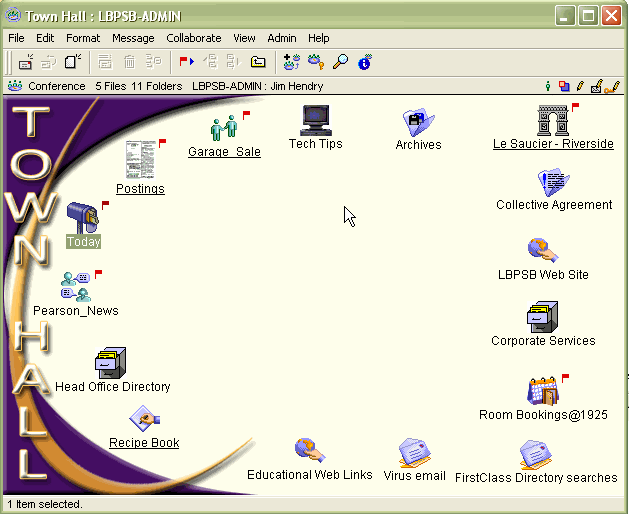
Town Hall conference
The Town Hall conference is a central location to get information, both school related (for example, Corporate Services), and social (for example, Garage Sale).
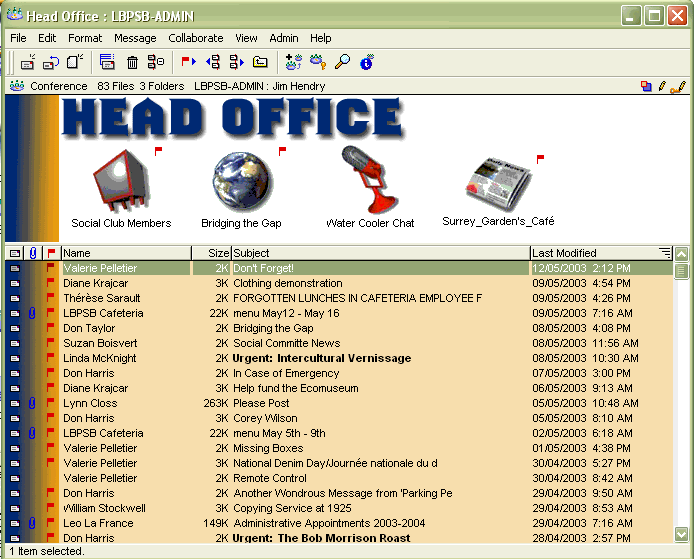
 Head Office conference
The Head Office is a conference where teachers can communicate with each other.
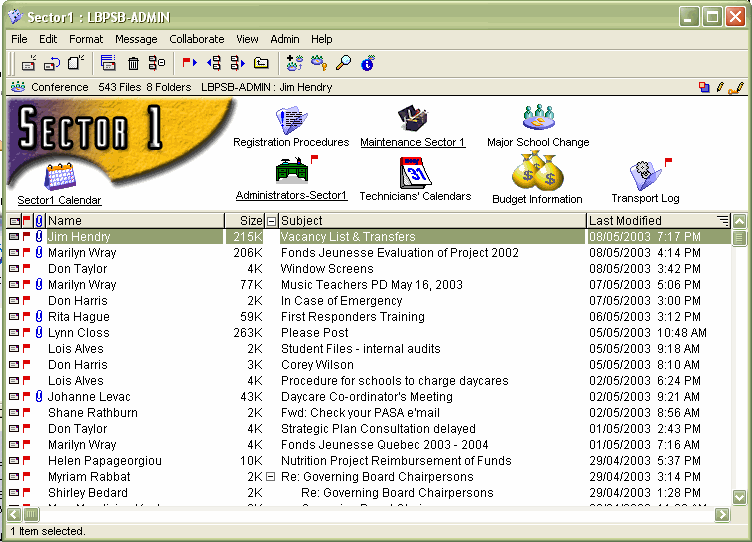
 Sector 1 conference
Sector 1 is a conference to collaborate or post information about high-level issues at the principal or school administrator level.
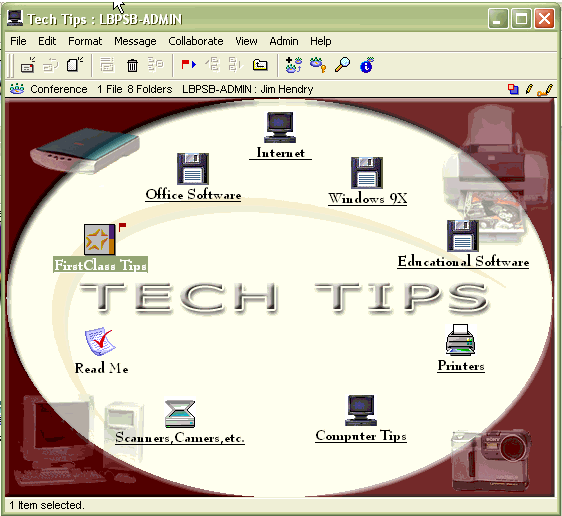
 Tech Tips conference
The Tech Tips conference provides technical information to help teachers solve their own problems.
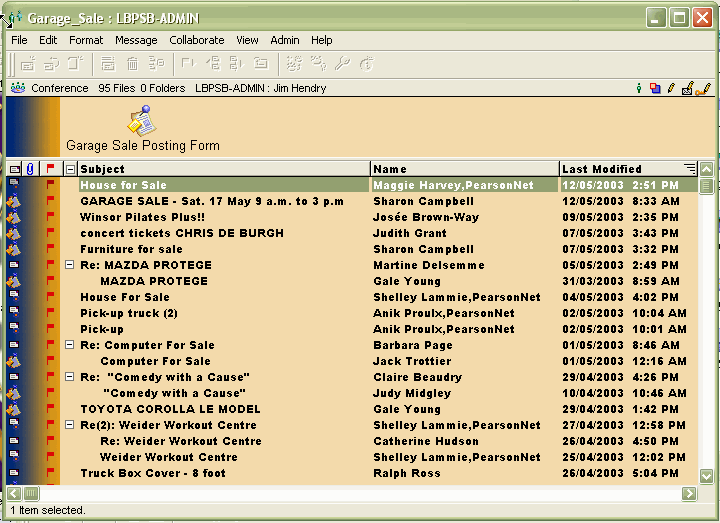
 Garage Sale conference
The Garage Sale conference is a social conference where teachers can post items to sell.
 We asked Jim to share some tips with us about how he built his system from the ground up. Here is what he had to say:
"Having a person who already believes in FirstClass is a great motivator when it comes time for you to develop your own system. Personally, I believe that you don't roll out a system unless it already has content, graphical interfaces to please the user, and provides a wealth of areas so as not to limit usage. The hardest users to "buy into the system" are the initial users. They logged in first to a pretty bare bones system and really didn't move around too much. Once a new user entered the system where the content and interaction was already available, they made it part of their daily routine."
Jim says he has secured buy-in from the user community by "offering them a valid, authentic, and viable tool. Never let it become stagnant."
FirstClass has made it much easier for teachers to manage their pet projects, as the following scenarios show.
Writing stories
"A grade 3 teacher read five books with her class and had a discussion about them. She then formed them into five teams to "write" the 6th book based on what they thought should happen. The teams were broken down into conferences which allow students to view (but not edit) each of the other teams' work so they could maintain continuity in the chapter they were responsible for (Example: Chapter 4 team writes about a car chase, so Chapter 3 team now has to write in how the characters got a car, and so on.)."
Tutoring sessions
With FirstClass, teachers can make themselves more available to students to help them with their studies. Here is a letter Jim received from one of his teachers:
Dear Jim,
I would like to thank you for all the work you've done to bring us FirstClass.
I have just received the results of one of the Math contests which we entered this year.
One of my grade 5 students was the top scorer across Canada in the Fibonacci contest. He was also provincial Champion. Two other grade 5 students made the Honour Roll (scoring over 36 out of 40). Our school placed 4th in the country and first in Quebec.
One of the things which made this possible was FirstClass. Although I used it in the crudest manner possible, typing in old contests, making Appleworks diagrams to explain answers, using email to deal with each student individually, First Class made it possible for me to deal with students when our normal meetings had to be cancelled because I had another meeting or other conflict. Whenever they had time to answer the questions I had set, evenings, Saturday, Sunday, I could get back to them with answers, suggestions or solutions, sometimes within a few minutes more often by the next morning. The result was I was able to do so much more than I could ever accomplish in ... after school meetings once a week.
Interestingly 2 of the 3 grade 5 students who scored the highest were among those who took greatest advantage of FirstClass. Our top scoring student in grade 6 was also one who used FirstClass more than most.
I started with students who were strong in math, but there is no doubt FirstClass has played an important role in helping them accomplish what they have and you had a hand in that.
Thanks again.
Voice Services
Jim Hendry does some great things with FirstClass Voice Services. Parents can call teachers and, using a voice menu, can hit one key to find out homework assignments and other important information.
Voice Services in the office
In addition, multiple submenu systems have been set up to provide the community with information without the need to speak with a person, giving employees "some room to breathe every day."
Multiple voice menus in Transportation Services guides callers through options like "Bus stops", "Courtesy busing", "Change of address" or "Safety", and gives basic information before it ever rings a phone. This ensures that each message ends up in the appropriate conference, and the entire department has access to each of those conferences. The voice menus allow employees to prioritize their work. When they are ready, they can listen to the call, move it to their Mailbox, or into another conference for someone else to respond to.
Their Registration Service uses one conference to receive the overflow of calls, and employees manage the conference the same way as Transportation Services.
Neat Jim trick
"One trick with voice menus I played with and use is to create a "fake" queue. The voice menu has one button available and the initial message. If a certain line is busy, then it goes to this "queue" which greets you with a message "All of our agents are currently busy......at any time press 1 to leave a message" (with about 60 seconds of dead air at the end). Since nothing is selected (unless 1) the voice menu acts as if the user is having difficulty and plays the message three times, then where the "I'm sorry message" goes I record another message (with a "touch tone" for transfer) which then says "transferring your call" which sends it back to the main number to see if it is free, and then repeats. So a caller can stay on line...or leave a message."
Using audio files for poetry discussions
In addition to Voice Services, teachers also use audio files in the classroom. A grade 6 English teacher loves poetry and Robert Frost, and wanted to have an area where the students could discuss Robert Frost and have the poems available at any time (so students couldn't say they lost the poem), as well as create poetry on their own and share it with the other students. Jim took this idea a step further with FirstClass and actually included an audio file of Robert Frost reading his own poems, and students reading their own poems. He also took advantage of the presentation mode so students could present their poems (with the help of an LCD projector).
Security and privacy
Jim had some good stuff to say about security. He pointed out that FirstClass isn't nearly as susceptible to viruses as the other solutions on the market. From a student's perspective, though, privacy is very important, and FirstClass stands up well here too.
Permissions play an important part in security. Jim's tip for security is something he says he got from other admins, "Remove all permissions at the start, and then give back what is needed based on the group." Here are some real-world examples from Jim:
1 A teacher puts material for Term 2 on students' Desktops during Term 1, but denies permissions until Term 2, allowing her to be fully prepared in advance.
2 Each student in a class has a conference on their Desktop which allows them to upload their web site creation projects. That conference is aliased to the teacher's home page folder, where Approval is a required permission. The students complete their pages and upload them to the conference, yet the teacher can feel secure that the pages cannot be viewed on the web until he has approved them.
3 Gifted children who need more of a challenge are given access to content of a higher grade level in another class. The History is turned off so the students will not be picked on by older students or peers. This gives a real sense of security to those gifted students.
"Administratively I just "enjoy" the security FirstClass provides. I come to work knowing that I have a system that will balk the most stubborn attempts to gain access to other areas."
When he tells parents that their children cannot send email out to the Internet, nor can they receive it, "the smiles appear."
"Also, if I need tighter security I know it's there in FirstClass. Password security can be implemented in a second if I need to. Blocking access to a student's preferences ensures the teacher can always have access to the account. Even the attaching of "groups" to a mail list allows limited access to those areas that only certain people have rights to."
Thanks for sharing Jim!
If you would like us to consider your site for a case study, contact us at TechNewsMail@firstclass.com.
Frequently asked questions How do I set the mail rules for a user? Open the user's Desktop, select the Mailbox, and choose Collaborate > Rules from the pulldown menu. Open the user's Desktop, select the Mailbox, and choose Collaborate > Rules from the pulldown menu.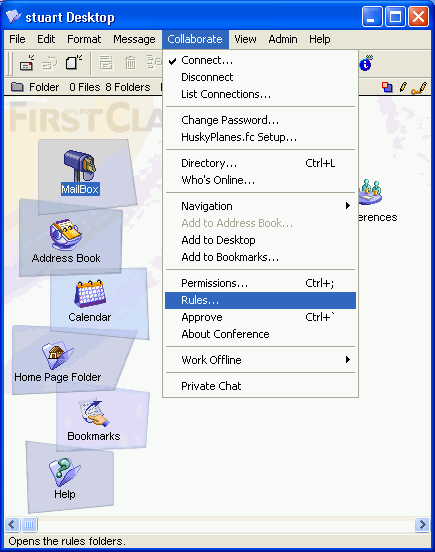 As an administrator, I can use the Mail Rules feature, but why can't my users? You have to give your users the Mail Rules preference. As an administrator, I can use the Mail Rules feature, but why can't my users? You have to give your users the Mail Rules preference. 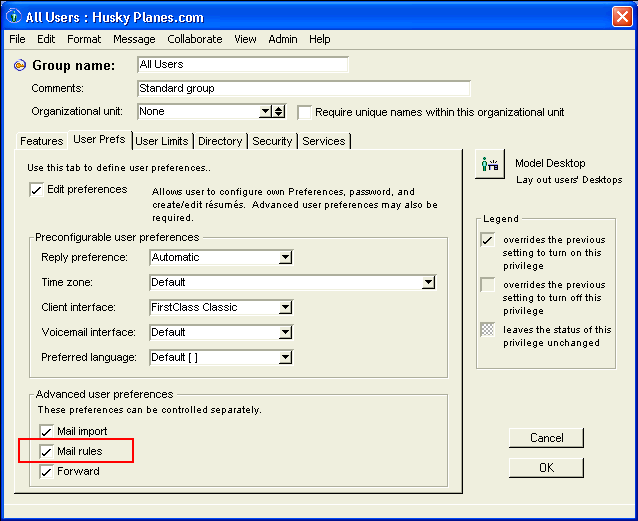 How do I set up my mail rules to reject "hot", but accept "photo"? You must enclose the word to be rejected in quotations with spaces around the word. So, in your mail rule, you would enter How do I set up my mail rules to reject "hot", but accept "photo"? You must enclose the word to be rejected in quotations with spaces around the word. So, in your mail rule, you would enter " hot "
in the field (with quotes).
Tech tip: Dialing restrictionsUsing dialing restrictions
Are you afraid of users abusing the outdialing capabilities of FirstClass Voice Services? With VS 7.1, you can restrict users from calling certain numbers or areas, or stop them from making outbound calls altogether. If you prefer, you can keep your system open for all outdialing through VS (as it was in previous versions). Outdialing restrictions were introduced to provide administrators with greater control over telephony costs that could be incurred through abuse of outdialing privileges.
Outdialing refers to the following actions available to callers and users during call answer or login sessions:
• call sender
• greeting transfer
• system revert
• through dial
• voice menu transfer.
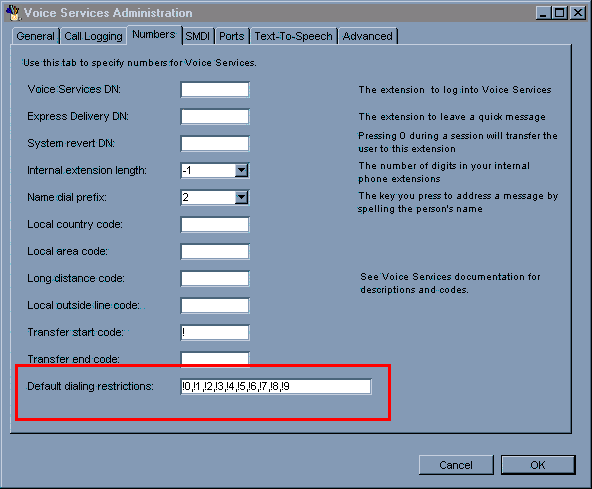
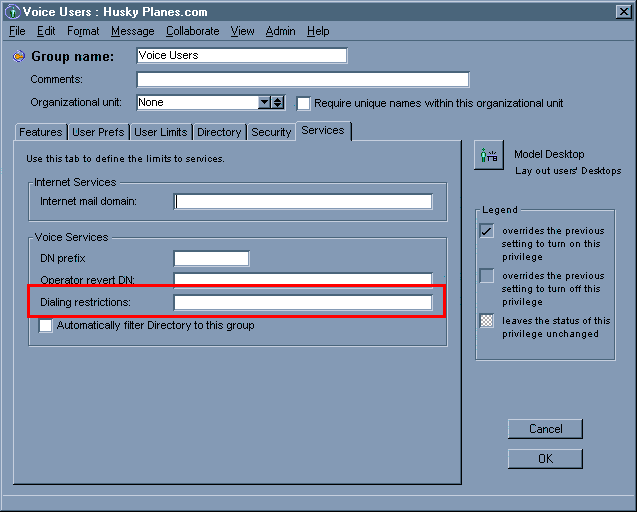
Dialing restrictions are set at the organizational unit (OU) level on the Services tab of the Group Privileges form and at the system level on the Numbers tab of the Voice Services Administration form. As with other FirstClass features which can be set at these two levels, what you set at the OU level overrides what is set at the system level.
When FirstClass Voice Services 7.1 is installed, dialing restrictions are set at the system level to allow no outdialing.
  Important
Include all long distance codes, and all pre-dialing codes (for example, 1 for North American long distance dialing, PBXs requiring an outside line access code (usually 9), and so on).
Dialing restrictions are used when dialing internal extensions as well numbers outside your system. If your internal extensions begin with 4, don't block your users from dialing 4.
How to use dialing restrictions
• Restrictions begin with !.
• Accessible dialing strings have no prefix.
• Restricted and accessible dialing strings can be combined by separating them with commas.
• In all cases, the most exact match will be used.
Examples
The following examples can help you set up specific dialing restrictions to allow your users to fully use VS without abusing their privileges and leaving you with the bill:
• The default on the Voice Services Administration form is !0,!1,!2,!3,!4,!5,!6,!7,!8,!9. No user can dial any number outside of your PBX with this configuration.
• The OU default is not activated (blank), which defaults to the Voice Services Administration form. Entering anything in this field will override all settings on the admin form.
• !9 disallows all calls to numbers beginning with 9. If 9 is the outside line code for your PBX, this will disallow all calls outside of your PBX.
For the following examples, assume there is no outside line code required:
• !9,9055551234 disallows all calls to numbers beginning with 9, but allows calls to the specific number 9055551234.
• !9,905,!9055554567 disallows all calls to numbers beginning with 9, but allows all calls to area code 905 except calls to the specific number 9055554567.
• While !1 disallows all North American long distance calls, it does not block the user from dialing the operator to make an operator-assisted long distance call.
If this field contains !0,!1,!2,!3,!4,!5,!6,!7,!8,!9 (preconfigured default) then no outdialing is permitted. If this field contains 0,1,2,3,4,5,6,7,8,9 then all dialing is unrestricted.
Warning
Never leave this field blank. It is best to always specify what is allowed and what is prohibited. This way, you won't shoot yourself in the foot.
In a future newsletter we will look at Call Detail Records (CDRs) and discuss how they can be used to further protect your system from abuse of outdialing privileges by allowing you to charge calls back to users.
ToolsCourtesy of the IT department
This new mirroring backup script runs on Microsoft Windows and requires FC Util 6.04 or higher. The script will write a small text file to the folder where the script is located. The presence of this file is checked at execution time and, if it is present, the script will abort.
Copy the content into a batch file, and then adjust the file paths to match your server and backup locations.
echo off
rem FirstClass Post Office Backup script for MS-Windows
rem (requires FCUtil 6.04 or higher).
TITLE FCPO Mirror Backup
rem Check for existence of file created by next line
rem of this script and exit if it exists.
IF EXIST fcbackup.run EXIT
rem Create the file checked for in the line above.
echo FirstClass Mirror Backup Script Currently Running >e:\fcserver\fcbackup.run
echo FirstClass backup script for MS-Windows.
rem Prepare backup destination. This section is not necessary
rem if you are backing your mirror up directly to tape.
rem For standard mapped network drives
IF EXIST y: net use y: /d
net use y: \\192.168.1.26\backup$
erase y:\fcpo8001\*.* /F/S/Q
rem For a NetApp
rem rsh 192.168.1.20 -l backup:password snap delete vol0 yesterday
rem rsh 192.168.1.20 -l backup:password snap rename vol0 today yesterday
:mstate
rem Test the state of the FirstClass mirror.
echo Testing the state of the FirstClass mirror.
rem Mirror has failed, go to section that resyncs the FC mirror.
e:\fcserver\fcutil MCHECK
IF ERRORLEVEL 5 goto mirrorfail
rem If ANY volume is synchronizing, go wait for the mirror to
rem become "Synchronized & Active".
e:\fcserver\fcutil MCHECK
IF ERRORLEVEL 4 goto wait
e:\fcserver\fcutil MCHECK
IF ERRORLEVEL 3 goto wait
rem If ALL volumes are "Synchronized & Active",
rem go pause the mirror.
e:\fcserver\fcutil MCHECK
IF ERRORLEVEL 2 goto pause
rem If FirstClass mirroring is not enabled, go to section
rem for no mirroring.
e:\fcserver\fcutil MCHECK
IF ERRORLEVEL 1 goto nomirror
rem Mirror is already paused.
e:\fcserver\fcutil MCHECK
IF ERRORLEVEL 0 goto wait
:pause
rem Mirror status is "Synchronized & Active". Pause the mirror.
echo Pausing FirstClass mirror.
e:\fcserver\fcutil pause
rem Wait, just to ensure the pause command has executed.
e:\fcserver\fcutil wait 6
rem Mirror has failed, go to section that resyncs the FC mirror.
e:\fcserver\fcutil MCHECK
IF ERRORLEVEL 5 goto mirrorfail
rem If ANY volume is synchronizing, go wait for the
rem mirror to become "Synchronized & Active".
rem If this is now true there has been a mirroring error
rem during the pause.
e:\fcserver\fcutil MCHECK
IF ERRORLEVEL 4 goto wait
e:\fcserver\fcutil MCHECK
IF ERRORLEVEL 3 goto wait
rem If this is true the pause command above has
rem not executed. Go try it again!
rem For servers that this happens to on a regular basis, try
rem increasing the wait time above.
e:\fcserver\fcutil MCHECK
IF ERRORLEVEL 2 goto pause
rem If FirstClass mirroring is not enabled,
rem go to section for no mirroring.
rem Although at this point this condition should never be true
rem (unless the admin has disabled mirroring since script
rem execution began), it must still be checked.
e:\fcserver\fcutil MCHECK
IF ERRORLEVEL 1 goto nomirror
rem The mirror has been paused, go back it up!
e:\fcserver\fcutil MCHECK
IF ERRORLEVEL 0 goto backup
:backup
rem Backup ALL FirstClass mirror volumes
echo FirstClass mirror paused. Backing up FCPO mirror files, please wait ...
rem Insert commands here to backup the paused mirror.
rem An example for NAS .snapshot is shown below.
rem rsh \\192.168.1.20 -l backup:password snap create vol0 today
IF NOT EXIST y: net use y: \\192.168.1.26\backup$
echo Backing up FirstClass mirror files.
xcopy i:\fcpo8001\*.* y:\umdemo\fcpo8001 /e/c/i/q/h/k
rem Wait a few seconds, just to make sure the backup has finished.
e:\fcserver\fcutil wait 6
net use y: /d
echo FirstClass mirror backup completed.
rem FirstClass mirror backup completed, continue the mirror!
goto continue
:continue
rem Continue the FirstClass mirror, this section assumes the backup
rem has completed and should NEVER be called from anywhere
rem but the :backup section of this script.
echo Continuing FirstClass mirror.
e:\fcserver\fcutil cont
rem Wait, just to ensure the continue command has executed.
e:\fcserver\fcutil wait 6
rem Mirror has failed, go to section that resyncs the FC mirror.
e:\fcserver\fcutil MCHECK
IF ERRORLEVEL 5 goto mirrorfail
rem Backup is done. Mirror Continue successful. Script can
rem go to end now!
e:\fcserver\fcutil MCHECK
IF ERRORLEVEL 4 goto end
e:\fcserver\fcutil MCHECK
IF ERRORLEVEL 3 goto end
e:\fcserver\fcutil MCHECK
IF ERRORLEVEL 2 goto end
rem If FirstClass mirroring is not enabled, go to section for.
rem no mirroring. At this point this condition should never be true
rem (unless the admin has disabled mirroring since script
rem execution began).
e:\fcserver\fcutil MCHECK
IF ERRORLEVEL 1 goto nomirror
rem If this is true the continue command above has not executed.
rem Go try it again!
e:\fcserver\fcutil MCHECK
IF ERRORLEVEL 0 goto continue
:wait
rem If this section is called there is a problem with the mirror!
echo FirstClass mirror NOT "Synchronized and Active". Waiting ...
rem Wait as long as the owner of this script says to
e:\fcserver\fcutil wait 6400
rem Mirror has failed, go resync the FC mirror.
e:\fcserver\fcutil MCHECK
IF ERRORLEVEL 5 goto mirrorfail
rem Mirror still not "Synchronized & Active". Keep waiting!
e:\fcserver\fcutil MCHECK
IF ERRORLEVEL 4 goto wait
e:\fcserver\fcutil MCHECK
IF ERRORLEVEL 3 goto wait
rem Mirror is now "Synchronized & Active", go try again.
e:\fcserver\fcutil MCHECK
IF ERRORLEVEL 2 goto mstate
rem If FirstClass mirroring is not enabled, go to section for.
rem no mirroring. Although this condition should never be true
rem (unless the admin has disabled mirroring since script execution
rem began), it must still be checked.
e:\fcserver\fcutil MCHECK
IF ERRORLEVEL 1 goto nomirror
rem Mirror still "Paused". Keep waiting!
e:\fcserver\fcutil MCHECK
IF ERRORLEVEL 0 goto wait
:mirrorfail
rem FirstClass mirror has FAILED. Resynhcronize now!
echo FirstClass mirror has FAILED.Full Synchronization Started!!!
e:\fcserver\fcutil resync
goto wait
:nomirror
rem FirstClass mirroring is NOT enabled, you must shut the server
rem down before backing up the post office!
echo FirstClass mirroring is NOT enabled. Script aborting.
goto end
:end
echo Script Processing complete.
rem Delete the file created at the top of this script.
rem If this script terminates abnormally, the file
rem fcbackup.run MUST be removed from the FCServer
rem folder manually. Until this is done this
rem script will abort on startup.
del e:\fcserver\fcbackup.run
EXIT
In future issues...Certain features mentioned here may not yet be released, and may not be currently available in all geographic regions. Open Text Corporation reserves the right to modify or cancel any features mentioned here.
• Case Study: Halton District School Board
Take a look inside another FirstClass site.
• Voice Services: Call Detail Records
Use CDRs to eliminate abuse of long distance calls.
• Mirror faults
How to troubleshoot mirror faults.
We still want to hear from youShare your thoughts and ideas
Do you have additional knowledge to share? New information or handy tricks to reveal? Please send them to us. In addition, send us questions you want answered by developers and technical staff, suggestions for articles and content, queries about how to perform tasks that may make your job easier, and general comments about our newsletter.
Site visits
The Information Development team conducts site visits to gain feedback from administrators and users of FirstClass. Previous visits have proved successful, and were found to be mutually beneficial. If you would like to schedule a site visit at your company, send us an email (currently in the Greater Toronto area only*).
*If you are outside of the Greater Toronto Area, we can organize a teleconference so you can still take advantage of the benefits these meetings provide.
Please send all correspondence to the TechNewsMail conference (TechNewsMail@firstclass.com).
Contact informationEditors: Ann Schwartz, Annette Ferron
TechNewsMail@firstclass.com (TechNewsMail conference)
www.firstclass.com
sales@firstclass.com (Sales)
support@firstclass.com (FirstClass Customer Support)
Please send all correspondence to the TechNewsMail conference (TechNewsMail@firstclass.com).
Main number: 905.762.6000
Main fax number: 905.762.6151
Toll-free number: 1.888.588.3444
Our address is:
Open Text Corporation
FirstClass Division
38 Leek Crescent
Richmond Hill, ON
Canada, L4B 4N8
ResourcesDocumentation
Looking for new documentation? Existing documentation? Check out Documentation on our web site.
Check our online help for copies of the documentation that correspond to your server version.
Training
The Richmond Hill office holds customized training courses throughout the year. For a training schedule or course descriptions, including prerequisites, see Training on our web site. If you have any questions, please address them to FirstClass Training or training@firstclass.com.
ArchivesPrevious newsletters can be found at Welcome to The FirstClass Newsletter on our web site.
Subscribing/UnsubscribingWe want this newsletter to reach all of the people in your organization who will directly benefit from it. If you would like to subscribe anybody else to this newsletter, please provide us with their email address or FirstClass account. Enter SUBSCRIBE as the subject line.
If you would like to unsubscribe to this newsletter, send us an email with the subject line UNSUBSCRIBE.
Please send all correspondence to the TechNewsMail conference (TechNewsMail@firstclass.com).
Copyright noticeInformation in this document is subject to change without notice. Certain features and products described in this document may not yet be released, and may not be currently available in all geographic regions.
All rights reserved. FirstClass is a registered trademark of Centrinity Inc. The FirstClass logo is a trademark of Centrinity Inc. All other trademarks are property of their respective owners.
This document is bound by international copyright law and the FirstClass Software License Agreement and Limited Warranty included with every FirstClass product.
Copyright 2003 by Open Text Corporation.
|