| Laiškas: The FirstClass Newsletter Vol 3 Issue 5 |
| Trečiadienis, 2003 Lapkričio 19 17:03 +0200 | |||||||
| Nuo: |
|
||||||
| Tema: | The FirstClass Newsletter Vol 3 Issue 5 | ||||||
| Kam: |
|
||||||
 A publication of the Information Development department
Vol 3, Issue 5
November 2003
 Editors' message Editors' messageThe end of the year is fast approaching, and we would like to thank those of you who have contributed case studies, FAQs, and tips to the newsletter. You have made this year's issues the best ever. We always try to address different topics and interests in each newsletter and provide information that can help you in your administration tasks. We encourage all of you to share your expertise and knowledge with fellow administrators so they can continuously improve their own FirstClass sites. Some of the things we are looking for are
• case studies from sites running multiple languages or using Unified Communications
• examples of interesting uses of mail rules
• examples of your filter documents (SMTP mail rules and attachment and subject blocks)
• information or handy tricks to share that you use to make your job easier and may be helpful to fellow admins
• questions you want answered by developers and technical staff
• suggestions for articles and content.
This year we increased the frequency of the newsletter and hope to put out even more issues in 2004. We've also had a huge jump in the number of subscribers. Presently, we maintain over 1,200 FirstClass administrators on our mailing lists, and we are still working to increase this number. Our goal is for our newsletter to reach every FirstClass administrator and subadministrator worldwide.
As this is the final issue of 2003, we would like to wish all of you a happy and safe holiday season. Again, thank you for helping us deliver quality newsletters; we hope they've been useful and informative. We look forward to a great new year with FirstClass.
Of special note in this issue
As many of you will be migrating your FirstClass environments from Mac OS 9 and earlier platforms to Mac OS X in preparation for FirstClass 8, you'll be interested in our article on FirstClass for Mac OS Classic end of life (EOL).
Also in this issue, we have included a terrific case study on the Halton District School Board's FirstClass site, courtesy of Jeff Catania, and a very cool set of mail rules created and used by Nigel Goodman, FirstClass administrator at Redwood College, South Bank University.
Enjoy this issue.
Editors
Annette Ferron
Ann Schwartz
 Contents Contents FirstClass for Mac OS Classic end of life (EOL) noticeCase study: Halton District School Board FirstClass for Mac OS Classic end of life (EOL) noticeCase study: Halton District School Board Frequently asked questions Frequently asked questions What is the difference between redirecting and autoforwarding incoming mail using a mail rule? When should I restart Internet Services as opposed to using Get Config and Flush Cache? When I start up Internet Services I see this message: "InetCfg: Discarding invalid IP mask 172.18.254". What does this mean? What is the difference between redirecting and autoforwarding incoming mail using a mail rule? When should I restart Internet Services as opposed to using Get Config and Flush Cache? When I start up Internet Services I see this message: "InetCfg: Discarding invalid IP mask 172.18.254". What does this mean? TUI tech tip TUI tech tipOutbound Call Detail Recording
 Tools ToolsAdvanced mail rules in action
 In future issues... In future issues...What to look for in future issues of the FirstClass Newsletter
 We still want to hear from you We still want to hear from youFeedback? Questions? Topic ideas?
 Contact information Contact information Resources ResourcesNew training courses and where to find documentation
 Archives ArchivesWhere to find previous newsletter issues
 Subscribing/Unsubscribing Subscribing/UnsubscribingSubscribe other members of your organization
 Copyright noticeFirstClass for Mac OS Classic end of life (EOL) notice Copyright noticeFirstClass for Mac OS Classic end of life (EOL) noticecourtesy of the Product Management department
EOL is the discontinuance of new releases, SPs (service packs) and quality enhancements for a product. Customer Support Center services remain available for an EOL product that is not more than two major releases older than the current shipping product.
As of the FirstClass 8 release (tentatively scheduled for release in Q1/2004), we will no longer support or make available FirstClass Server and protocol module products for Mac OS Classic platforms (Mac OS 9.x and earlier).
The affected FirstClass products we will no longer support are inclusive of but not limited to
• FirstClass Core Server
• FirstClass Internet Services
• FirstClass Personal
• FirstClass Developer Toolkits.
We will fully support Mac OS Classic FirstClass Server and protocol module products for FirstClass 7.1 SP3 (latest service pack) and any subsequent 7.1 service packs.
For the foreseeable future, we will continue to support and make available FirstClass client products for the Mac OS Classic platform in all upcoming new FirstClass releases and service packs.
The next generation: FirstClass for Mac OS X platforms
The FirstClass Division of Open Text is proud of its history with Apple platforms. Our very first commercial product was released on the Mac OS Classic platform back in 1990. Since that time, FirstClass products have been continuously stretching the limits of Mac systems running Mac OS Classic. However, we have reached the end of the Mac OS Classic era.
We've received overwhelming, positive reception for our Mac OS X products since first release early this year. Apple, in the meantime, announced that high end Mac systems would not be able to run OS 9 beyond June. For these reasons, new FirstClass Server product development for Mac systems will be exclusively based on Mac OS X. We believe this focus will enable us to deliver a new generation of high performance, high quality, FirstClass products for Mac OS systems.
FirstClass 7.1 for Mac OS X is available as a free upgrade for Mac OS Classic sites, as part of current Maintenance and Customer Support (M&S) contract coverage. Upgrading to FirstClass 8, when generally available, for Mac OS X will also be available through your current M&S contract.
For instructions on upgrading from previous versions of FirstClass to FirstClass 7.1, contact the Customer Support Center on FCOL or at www.firstclass.com.
Customer support of EOL FirstClass releases
FirstClass Division policy is to provide product support going back to the last two major FirstClass releases. Specifically, the Customer Support Center will provide administrator support for FirstClass 7.x and FirstClass 6. Customers on releases previous to FirstClass 6 will be requested to upgrade to FirstClass 6.1 as the initial step to resolving site issues. You can contact customer support at
• 1-800-346-9108 (FirstClass Division’s toll-free number for the North American Customer Support Center)
• +353-61-725-200 (FirstClass Division’s International Customer Support Center).
Case studycourtesy of Jeff Catania, School Programs Coordinator, Halton District School Board
Halton District School Board chooses FirstClass
Jeff Catania is a School Programs Coordinator for the Halton District School Board (HDSB), one of our earliest FirstClass users. Recently, we visited Jeff and the rest of the team to see some of the exciting things they are doing on their FirstClass site. The team consists of:
• Jeff Catania, eLearning Coordinator
• Mary Taylor, IT Coordinator
• Shawn Pomfret, FirstClass Administrator
• Cathy Thier, System Operations Manager
• Keith Johnson, IT Superintendent
• George MacRae (retired), Original FirstClass Innovator in Halton.
In this case study we examine
• why HDSB chose FirstClass as their solution
• how they installed and rolled out FirstClass to their staff and students
• how their teachers use FirstClass for online learning and collaboration
• how they currently maintain system security
• how to run your own FirstClass workshop.
Background: Why FirstClass?
"We didn't choose FirstClass so much as it chose us," Jeff says. "HDSB started as an experimental system about 12 years ago for a few staff to use with their students. From there, it grew quickly and became a communication tool for all teachers."
About seven years ago, HDSB adopted Microsoft Exchange for administrative email. Many people, including Jeff, thought that the use of two systems was creating division within the school system and causing poor communication and double work for many employees. The solution was to fully migrate to one of the two systems. While some felt that FirstClass was the way to go, others felt that Microsoft was the one to keep. That started a long, challenging struggle to choose one system. They formed a committee of 13 people (IT staff, teachers, and administrators) to gather input, create criteria (50+), rank the two systems based on those criteria, and sort through tons of information to pick one system. In comparing FirstClass 6 with Microsoft Exchange 2000, they used categories such as
• Support: How easy is it to maintain and what is its growth potential?
• Usability: How easy is it to use and how much power does it give users?
• Mail: How easily does it support basic communication?
• Access: How versatile is the client? Does it have roaming access? Concurrent access?
• Workflow: How well does it support calendaring, handhelds, and integration with other systems?
• Pedagogy: How suitable is it for a learning environment?
• Conferencing: What are its collaborative features, synchronous and asynchronous?
• Migration cost: What is the total cost of ownership (including servers, licensing, administration, and so on)?
Jeff states, "The amazing thing was the result of our analysis. The entire committee ranked FirstClass as superior to Microsoft Exchange in ALL the criteria categories. Further, 12 out of 13 committee members selected FirstClass as superior to Microsoft Exchange overall, even though more than a third of the group were Microsoft Exchange supporters prior to the process."
A year ago, HDSB put all staff on FirstClass and phased out Microsoft Exchange. Although they encountered some resistance from long-time Microsoft Exchange users, after a year of migration they are 99% there and all employees have FirstClass accounts.
In Jeff's words, "I think this is a unique success story since many boards still struggle with using Microsoft Exchange or Lotus Notes or multiple systems...and cannot find a way to migrate to FirstClass. We did find a way to get to one system and we picked the right one so we are at an advantage now."
More information
The FirstClass Division has products to help you migrate your site from Microsoft Exchange or Lotus Notes to FirstClass: FirstClass Migrator and FirstClass Connector.Volume 1 Issue 2 of The FirstClass Newsletter has an article about the FirstClass Migrator for Microsoft Exchange. Call your sales representative for more information.
The FirstClass system and its users
HDSB's FirstClass system runs on a dual processor Xeon 700 MHz machine. They have a 72 GB post office that currently uses 30-40 GB. They have mirrored their operating system to another 72 GB drive, and they can perform up to 1,000 batch admin commands at a time. They also run a T1 line to every one of their 80-90 sites. Their server platforms run on Intel Compaq PCs; they have a total of about 10,000 units that are both Mac- and PC-based, and they have about 11,000 ports, which include ports for workstations. They presently have a student-to-computer ratio of about 6:1, which they are currently improving.
HDSB has about 5,000 employees. For over a decade, they maintained about 8,500 users. Since they made their decision to choose FirstClass, they have started giving accounts to all of the students in Halton. They acquired 10,000 new licenses last year and 23,000 more this year, bringing the total to over 40,000. They plan to activate 15,000-20,000 this year as 20 pilot schools get accounts for every student in their schools.
These pilot schools will implement the concept of class conferences, where each class has a main conference for communication. To support these pilot schools, HDSB is running online courses to teach FirstClass to key staff.
"Our goal is to have every student from grades 2-12 with an account by default that they keep for their entire school career. We would need to purchase a few thousand more licenses to make this goal, but we're close!" Jeff says.
Example: The gifted class
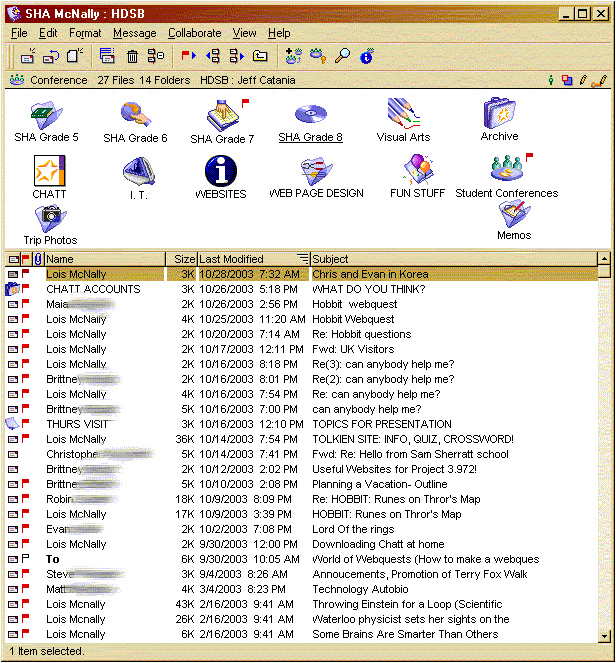
Teacher Lois McNally runs a gifted class for students in grades 5-8. Her class has access to a bookable set of wireless iBooks, and they communicate through a class conference. If they are working on projects, they share their resources by posting Internet links to the class conference. Lois has a separate conference for each grade level within her class conference, where she posts project details for each grade.
This is Lois' class conference. You can see the communication with students at the main level, and the different subconferences for each grade level.
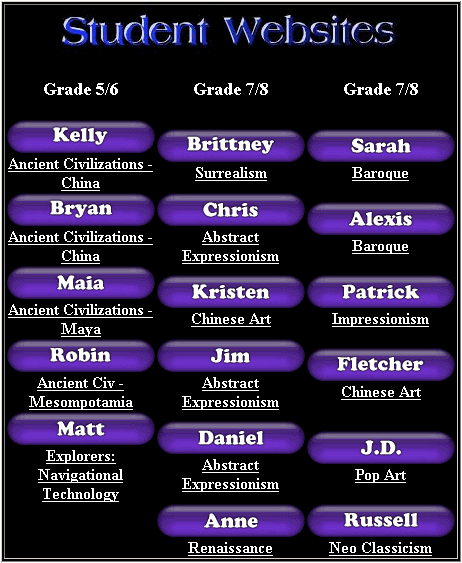
 Students create their projects in FirstClass, and Lois provides feedback for them using the FirstClass editor features. If students need to create something outside of the computer, Lois takes digital pictures of the creation and uploads them to FirstClass. When the projects are finished, Lois showcases them on her home page for peers and parents. This is a portion of her home page that showcases student work. Peers and parents simply click on the project they want to see.
 Getting buy-in
Jeff says, "Educational user buy-in was rapid and painless. The interface is intuitive and the fact that FirstClass can run on old clunkers and allows one to log in at any workstation meant that teachers rapidly adopted it without complaint."
One issue HDSB encountered was with some users who had been used to Microsoft Exchange. At first they were uncomfortable with the difference in interface. The conference-centric nature of FirstClass (versus the mail-centric nature of Microsoft Exchange) was a major difference that took some getting used to, but in the end they realized that FirstClass is a far more powerful long-term approach.
Another issue was that, because of the principles of convergence, access, openness and empowerment that HDSB adopted, the FirstClass system seemed large and complex (which it was) compared to Microsoft Exchange. As Jeff puts it:
"Before the migration, it was like we had two separate rooms of people walking around in the dark trying to communicate with each other. When we combined the systems and opened up the permissions, it was like knocking down the walls and turning on the lights. Most people loved it, but some wanted to go back."
Interestingly, Microsoft Exchange users seemed to prefer their restrictions, because the concept of a conference was foreign to most of them. They didn't want the ability to drill down to stuff that they felt was not relevant to them. At first, they were bothered by all the red flags and conference substructures, because they perceived it as mail that they had to read. They are realizing now that they don't need to drill down and read everything in the system.
Jeff goes on to say, "The other thing I believe strongly (and that is slowly helping people to embrace FirstClass) is that FirstClass supports the fact that roles in our organization cannot be pigeon-holed and compartmentalized. Said another way, there are always interactions and collaboration that fall outside of local departments or workgroups, no matter how much one thinks one can always work in neatly separated groups. For example, I work with people in all departments and schools and there are always times when people in HR, business services, facilities need to cross over and work with other departments and/or educational staff. Having an open FirstClass system facilitates this type of access to information and work."
HDSB now uses FirstClass conferences in the classroom, between teachers, between school administration, and between teachers and administration. They now have what they call "families" of conferences, including 87 active school conferences, administrative conferences, student conferences, committees, and so on.
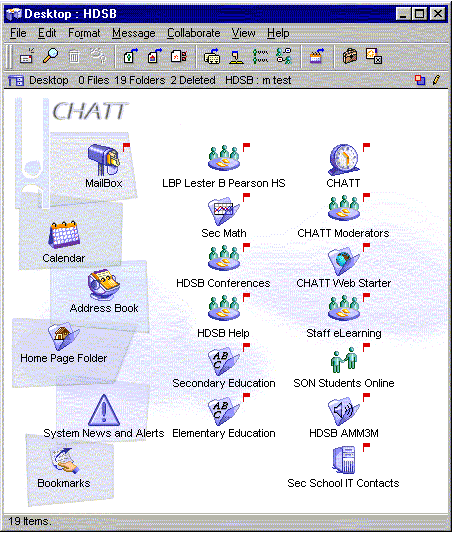
Here is a teacher's standard FirstClass Desktop on the HDSB system. As you can see, teachers have a lot of resources available to them right from their Desktops.
 How teachers use FirstClass
This section discusses how teachers use FirstClass to create workshops, communicate with peers, and manage and share knowledge and resources. It also shows how FirstClass is used to connect school boards, run online courses, and share information with parents and students using home pages.
Creating workshops
Teams of teachers use FirstClass to write online courses. They can all see the content and edit it together, with the latest revisions there for anyone to see. Here you can see one such course in progress, with staff learning online how to use FirstClass with students.
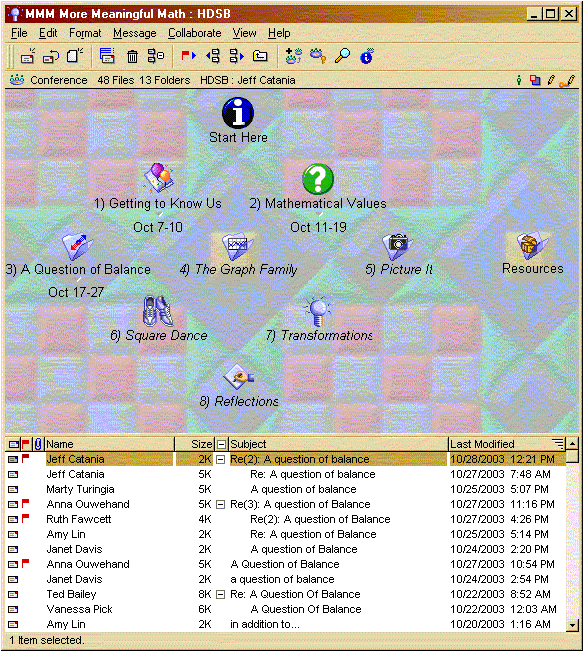
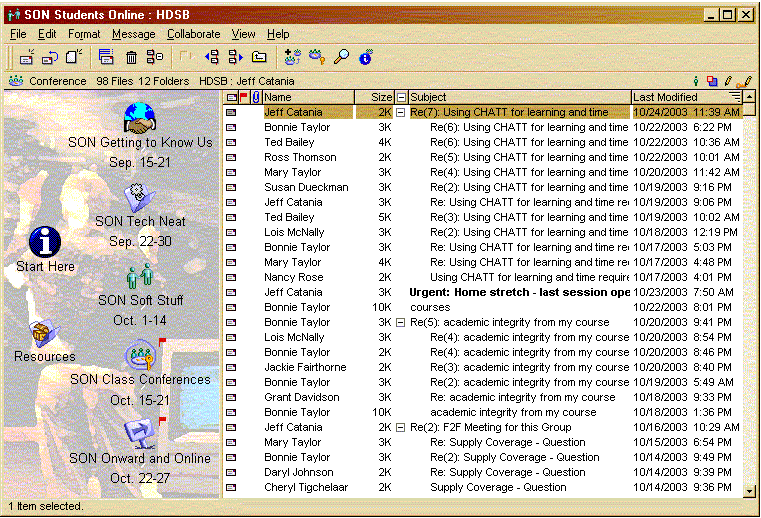 Here is an online Math workshop put together by math teachers (Amy Lin and Ted Bailey). It has a starting point (Start Here) that introduces the course and tells them how to navigate through it, and a series of chapters as individual conferences (1) Getting to Know Us, 2) Mathematical Values, and so on). Notice that dates are added to the conference name once the chapter is complete.
 Peer communication
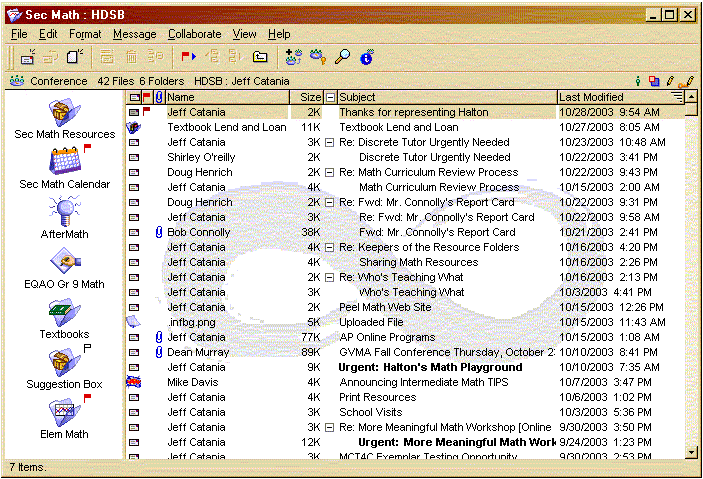
Staff also use FirstClass to book resources, coordinate their schedules, brainstorm and create agendas using shared FirstClass documents, and even update the school web site. They also use FirstClass conferences for the different departments, committees and other groups in the school. For example, Math teachers across the system regionally use this conference to collaborate.
 Knowledge management
Groups in the HDSB FirstClass system are in the process of archiving and organizing their processes, protocols, procedures and resources using FirstClass documents. This way, staff can always access the latest and greatest information in one place and easily maintain it. They can also alias the information to the web. Some of the projects they are currently working on are
• teacher handbook/procedures
• administrator handbook/procedures
• HDSB forms (for all departments)
• training manuals
• IT Staff handbook
• acceptable use guidelines
• 70+ online staff and student courses
• 600+ teacher web sites
• school web content
• school council web content
• HDSB eLearning web site.
Sharing resources
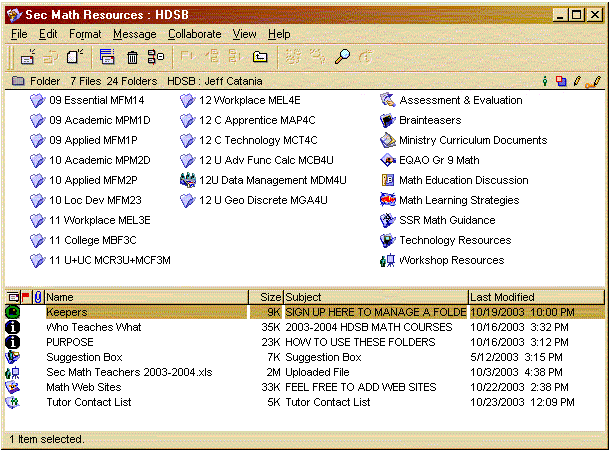
There is a discussion area in the FirstClass system for all math teachers, but there is also a folder structure for math resources. In here, teachers can freely upload/download and share exams, tests, quizzes, assignments, rich tasks, assessment tools, web links, and so on. Jeff says, "It's like Napster for curriculum resources."
This conference makes Math resources available to other teachers.
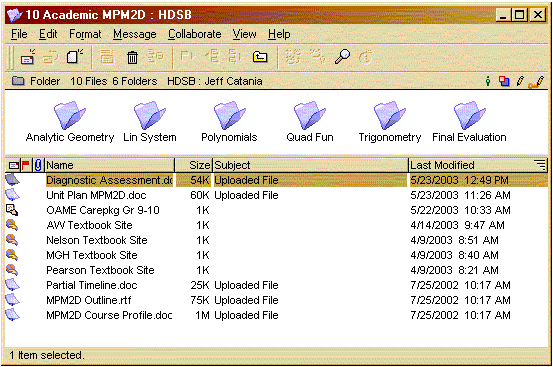
 Within each of the above folders, there is a set of resources for that particular subject. This is the resource folder for 10 Academic MPM2D.
 Connecting school boards
Jeff is in the process of trying to set up gateways to other boards in order to set up conferences for provincial organizations. The Ontario Math Coordinator's Association uses the HDSB FirstClass server to host their discussion conference. Members on other boards can gateway their FirstClass server, get an account on the HDSB system, or just receive the messages using mail rules.
Jeff adds, "This extends the power of FirstClass collaboration to the provincial level without getting into annoying extra logins (which people never check) or listservs for the most part."
Online courses
HDSB has designed their online teacher courses to be moderated by a skilled facilitator, and not just be self-paced, "assignments online" experiences. The courses are discussion based, with a variety of resources and tasks to engage learners.
Here is the eLearning conference where staff and students access their courses.
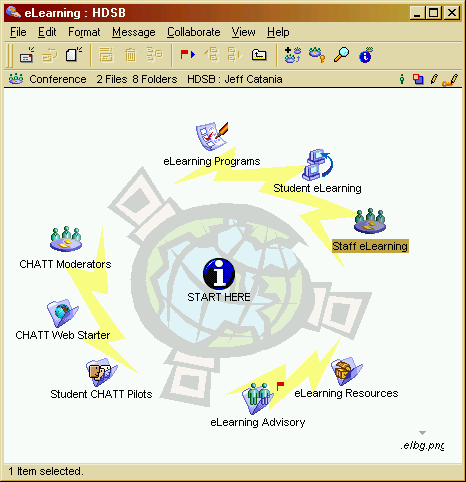 There are over 70 online teacher courses available. Some of the titles are
• Creating the Math Classroom
• Delving into Data
• Enhancing Online Communities
• Linking Assessment+Instruction
• Media Literacy
• More Meaningful Mathematics
• Problem Solving in Mathematics
• Reading Across the Curriculum
• School to Career Portfolios.
Here is the Staff eLearning conference where teachers can access these courses.
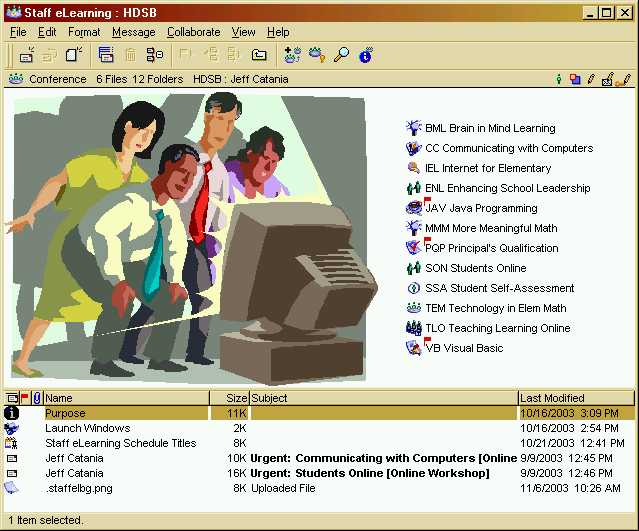 Jeff says, "Since the teachers in our system use FirstClass regularly, accessing and learning in FirstClass is not a hurdle to be overcome and the online courses become meaningful collaborative experiences amongst the participants."
HDSB has also started some eLearning classes for students. They ran a Civics/Careers course online in FirstClass and are launching a Music and Computers course this year that is "rapidly developing into a very cool course using FirstClass", says Jeff. They also run both AP Calculus and English online in FirstClass.
Jeff continues, "By far the biggest impact on student learning online will be in terms of augmenting the face-to-face classroom using FirstClass conferences, home pages and other tools."
Home pages
The user home page feature has allowed many of the HDSB teachers (600+) to launch and maintain FirstClass web sites. This lets students help themselves 24/7 to homework assignments, schedules, handouts, and so on. It also provides information for parents.
Jeff says, "We have taken a ... unique approach to the home page that I have not found in any other board in that teachers have been encouraged to use only FirstClass documents (not the typical autoopen home page or HTML), which leads to simplicity and rapid adoption. We allow all teachers to create home pages (not restricted) and generally adopt a principle of 'trust over restriction'."
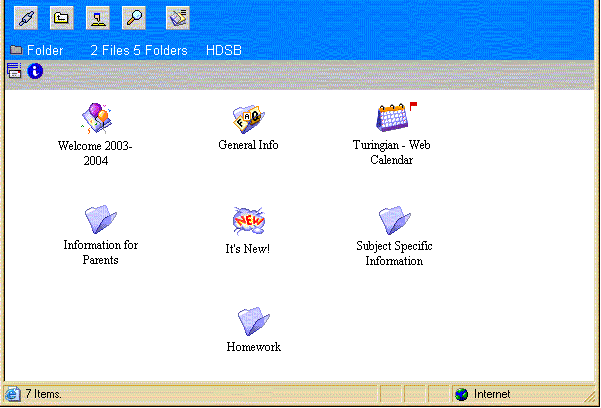
This home page provides, among other things, information for parents, homework for students, and a class calendar so parents and students can keep track of upcoming events and deadlines.
 Supporting the teachers
HDSB has centralized their support system into a conference called HDSB Help. It contains stationery forms, absentee forms, reference materials, and other materials necessary for a support group. This is the HDSB Help conference.
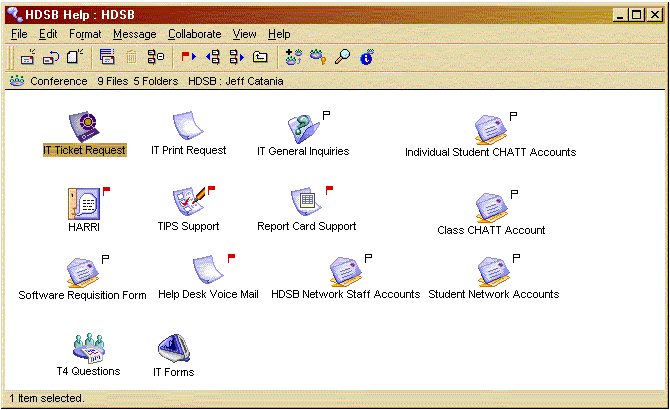 Security
HDSB gives their teachers 24/7 access to FirstClass. However, they set their inactivity logoff setting to 10 minutes so students can't get into teacher accounts. Student accounts are limited to 5 MB, with teacher accounts limited to 100 MB with a 90 day expiry. Administration staff accounts are limited to 100 MB with a one year expiry.
Currently, very few teachers have conference creation permissions. HDSB has strict naming conventions for conferences, so they are looking for a way to enforce those conventions, while still allowing teachers to create conferences. One of the things they are looking into is using a RAD application to automatically precede the new conference name with the appropriate course code.
Jeff says, "We're trying to hit a balance between empowerment and control. Our team has have been trying to distribute power to the users, trying to push out a RAD app that will help people control the user groups and monitor them, and so on."
Admins helping admins
If you know of a way Jeff's team can achieve conference creation using automatic naming conventions, let us know so we can share it with Jeff and other admins.
Run your own workshop
Jeff and his team have designed a series of online workshops. He has generously offered the full content of the workshops to any Ontario public school board who is interested in running the workshops.
You can view a list of workshops at http://www.elearningconsortium.ca.
To receive these workshops, contact Jeff at cataniaj@hdsb.ca to get a FirstClass version of these courses. You must include your FirstClass server version and administrator email address. You will then be sent a batch import email message for local processing. The message will contain folders and FirstClass documents which can later be turned into
conferences as desired.
Frequently asked questions What is the difference between redirecting and autoforwarding incoming mail using a mail rule? The only difference between a redirect and an autoforward is that the redirected message will be addressed from the original sender rather than the user who redirected it (a redirect to a conference requires the original user to have authority to write to the conference). Messages that are autoforwarded will be addressed from the user who autoforwarded it. The only difference between a redirect and an autoforward is that the redirected message will be addressed from the original sender rather than the user who redirected it (a redirect to a conference requires the original user to have authority to write to the conference). Messages that are autoforwarded will be addressed from the user who autoforwarded it.An autoforwarded message is always from a valid FirstClass user, whereas a redirected message can be from any Internet (and possibly fake) address. This can create some additional NDN cases that would not be present with autoforward.
When should I restart Internet Services as opposed to using Get Config and Flush Cache? You should restart Internet Services whenever you make changes to the ports it is listening on or when the number of tasks running changes. Examples of tasks include adding Internet sessions or enabling/disabling a protocol. Use Get Config after any other Internet Services configuration changes, such as changes to an Internet Services form or filters document. Flush Cache simply clears Internet Services cached HTTP pages. When I start up Internet Services I see this message: "InetCfg: Discarding invalid IP mask 172.18.254." What does this mean? This message means that there is an incomplete IP address entry in the filters folder. Find the incorrect entry (in this case 172.18.254) in the filter document and replace it with a valid entry (for example, 172.18.254.* or 172.18.254.25). Then select Get Config from the Internet Services Monitor.TUI tech tip: Outbound Call Detail RecordingTired of paying for users' long distance transfers? Using FirstClass Voice Services outbound Call Detail Records (CDRs) and minimal development work, you can bill users for their long distance usage of Voice Services.
In the last newsletter, we looked at how to use dialing restrictions to stop users from using Voice Services to dial long distance numbers or exchanges. In some setups, however, dialing restrictions are not appropriate. This doesn't necessarily mean you'll be stuck with the long distance charges incurred by your users. CDRs can be generated on a daily or monthly basis, and are in a tab-delimited ASCII file format which can be imported into many proprietary billing systems with limited development work.
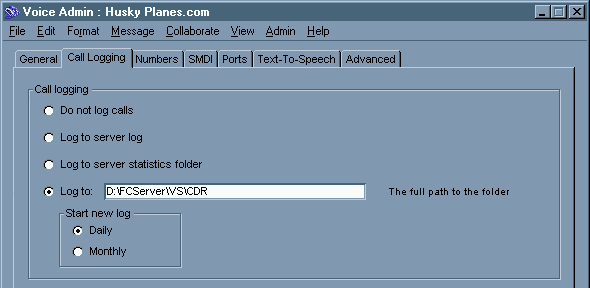
The outbound CDR will be written to a log file in the location specified on the Call Logging tab of the Voice Services Administration form.
 The log contains the following information (the numbers in the example correspond to the numbered list below):
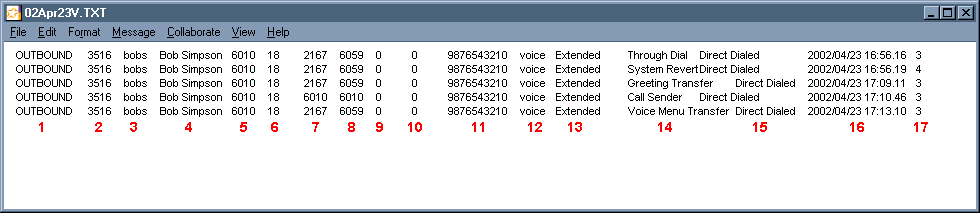 1 The call detail record type. This will always be OUTBOUND for outbound CDRs.
2 The FirstClass client ID.
3 The FirstClass user ID.
4 The user's name.
5 The user's DN.
6 The user's primary organizational unit ID.
7 The outbound phone number called by the user.
8 The phone number the call originated from (for example, the number that called the user).
9 The inbound port number. If this information is unavailable, it will be 0.
10 The outbound port number. If this information is unavailable, it will be 0.
11 The phone number used to make the outbound call. This field is only applicable on digital systems which have lines configured specifically for outbound dialing.
12 The Voice Services gateway name identifying which clustered Voice Service was used. If you are not using clustered Voice Services, this will be the voice gateway name.
13 The outgoing call style. This is how your system handles call transfers. The possible values are:
• Extended
• Transferred.
14 The reason code, or function used to generate the outgoing call. Possible values are
• Call sender
• Greeting transfer
• System revert
• Through dial
• Voice menu transfer.
15 The call type. Voice Services currently supports Direct Dialed calls only.
16 The date and time of the outbound call.
17 The duration of the call. This value cannot be tracked for configurations involving Brooktrout TR114 analog voice cards.
 Tools: Advanced mail rules in action Tools: Advanced mail rules in actioncourtesy of Nigel Goodman, FirstClass administrator Redwood College, South Bank University
This year, for the first time, the Faculty of Health and Social Care at London South Bank University decided that students entering the undergraduate nursing program in September would submit their first 500 word assignment online. Since the Faculty uses FirstClass for all its electronic communications, it was the obvious place for the online submission.
Since a FirstClass Group already exists for the students in this course, the first task was to create three conferences for the submissions:
• the conference to receive the assignments
The first conference is used to hold student assignments. Students can only send items but have no other access. The course director responsible for distributing the assignments for marking has Read access.
A number of folders are located in the conference, each containing approximately 25 assignments for marking. Each participating teacher marks no more than 25 assignments and only sees the contents of her own folder via conference aliases. These folders are made available to the markers at marking time.
The receiving conference is also Unlisted, so the only way to send to it is to know its name or use the stationery documents (described later).
• the conference to hold copies of the assignments for backup
The second conference is used only as a backup, in case of major errors, to hold copies of submitted assignments. Students can only send items to this conference (similar to the first conference) and only FirstClass subadministrators can see its contents. A mail rule redirects all submissions to the second conference. A Redirect makes the message appear to come from the sender, so students need the permission to send to it.
• the conference to hold the assignments after marking.
The third conference is used to hold the assignments that have been marked and are ready for moderation. The markers can only send to this conference but the course director has Read access.
Stationery
Two Stationery documents were created in the students' course conference. These were preaddressed to the recipient conference and contained instructions for the submission process. The first document was a test submission document named Subject Test Assignment Submission (this name is checked by the rules on the recipient conference described later). The second document was the actual submission document, named On-line Assignment Submission.
Configuring the mail rules
The mail rules sent to the recipient conference are the most important part of the online submission process. There are eight rules in total and the order of the rules is extremely important, because they run in the order they are listed.
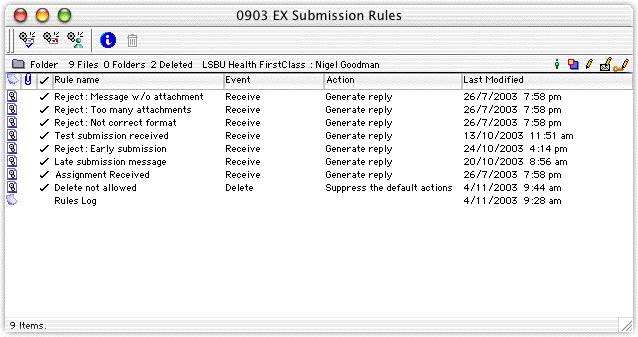 Rule 1 Reject: Message w/o attachment
This rule checks to see if the number of message attachments is less than 1. If this condition is true (no attachment), the rule sends this rejection reply:
WARNING. Your assignment submission did not contain an attachment and cannot be accepted. Please ensure your message contains the assignment for marking.
The received message is deleted silently and the rules processing is then stopped.
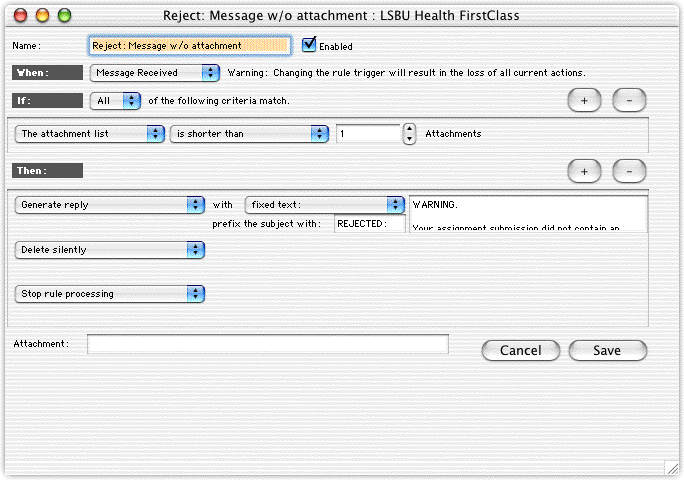 Rule 2 Reject: Too many attachments
This rule checks if the number of attachments is more than 1. If this condition is true (more than one attachment), the rule sends this rejection reply:
WARNING. Your assignment submission contained too many attachments and cannot be accepted. Please ensure your message contains just the assignment for marking.
The received message is deleted silently and the rules processing is then stopped.
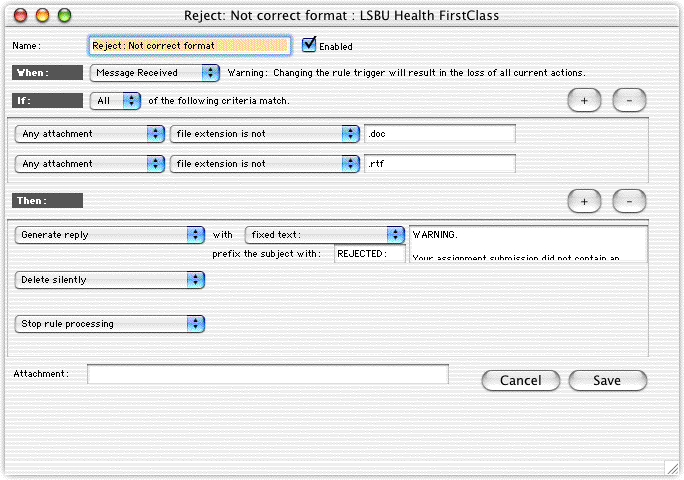
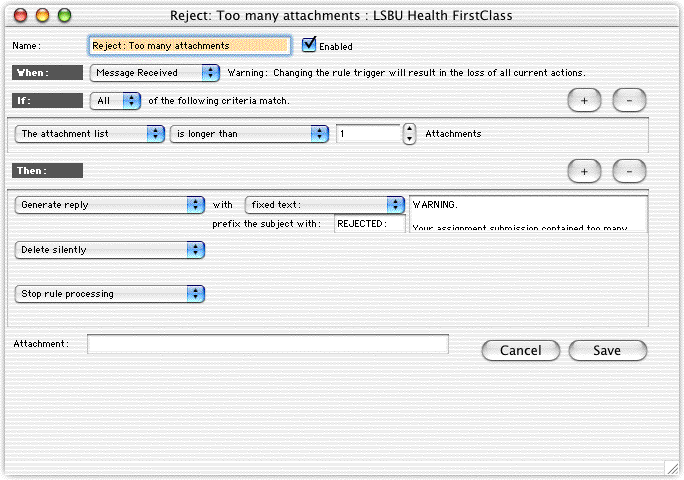 Rule 3 Reject: Not correct format
This rule checks if the attachment file extension is either .doc or .rtf. If the attachment has an extension other than .doc or .rtf, the rule sends this rejection reply:
WARNING. Your assignment submission did not contain an attachment in the correct format and cannot be accepted. Please ensure your message contains an assignment in either Microsoft Word format (with the extension .doc) or Rich Text Format (with the extension .rtf).
Mac OS users are instructed on how to check if the attachment contains the correct extension. Windows users are instructed not to add the extension themselves. This information is in a document located in the students' course conference, which also contains the required stationery messages. Students also receive a paper copy of these instructions.
The received message is deleted silently and the rules processing is then stopped.
 Note NoteThis does not actually check if the attachment is a Word or RTF file, it only checks the extension name.
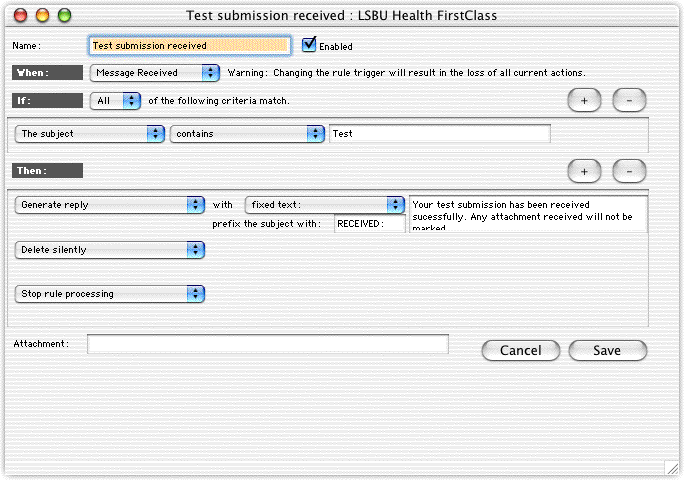
 Rule 4 Test submission received
This rule checks if the Subject field contains the word Test and, if true, responds with this received reply:
Your test submission has been received successfully. Any attachment received will not be marked.
The message is then deleted silently and the rules processing is stopped. As long as the students receive an appropriate reply, they are happy, so it is unnecessary to actually keep the test submissions.
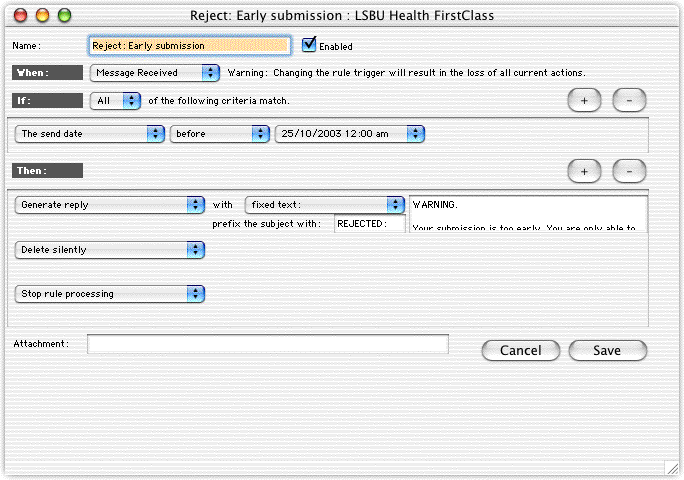
 Rule 5 Reject: Early submission
This rule checks the date of the submission and, if it is too early (the submission period is two weeks prior to the submission date), sends this rejection reply:
WARNING. Your submission is too early. You are only able to submit your assignment 2 weeks prior to the submission date. Your submission has not been accepted.
The received message is then deleted silently and the rules processing is stopped.
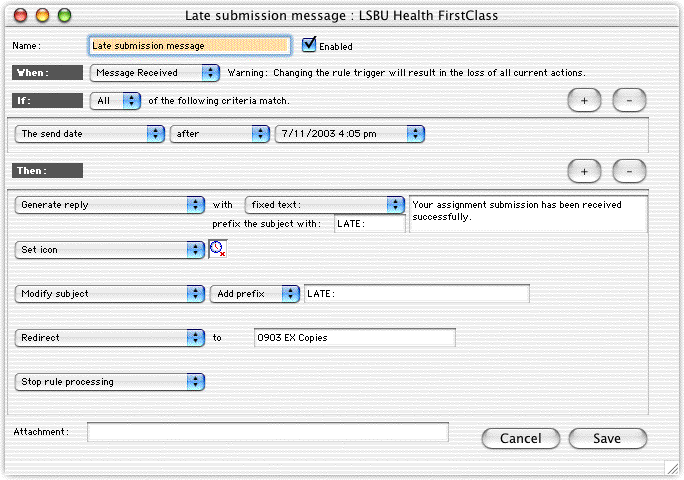
 Rule 6 Late submission message
This rule checks if the date and time of the submission deadline has passed. If the deadline has passed, the rule sends this accepted reply that describes the university regulations for late submissions:
Your assignment submission has been received successfully. However, it was submitted late and will be subject to a mark-capping of 40%. Please ask your unit leader for advice about this.
This rule then changes the original icon to a late icon and adds the prefix LATE: to the subject of the message.
The message is then redirected to the Copies conference and the rules processing is stopped. This results in two copies of the submission.
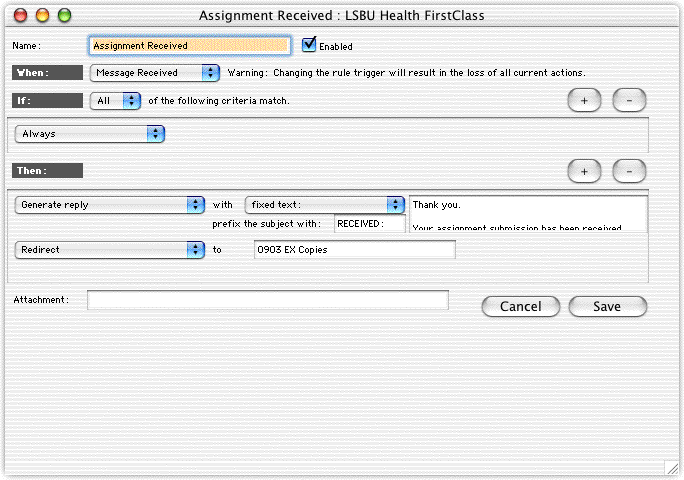
 Rule 7 Assignment received
This rule accepts a submission and sends this accepted reply, if a submission is true for all of the above rules:
Thank you. Your assignment submission has been received successfully.
The message is then redirected to the Copies conference for a backup copy.
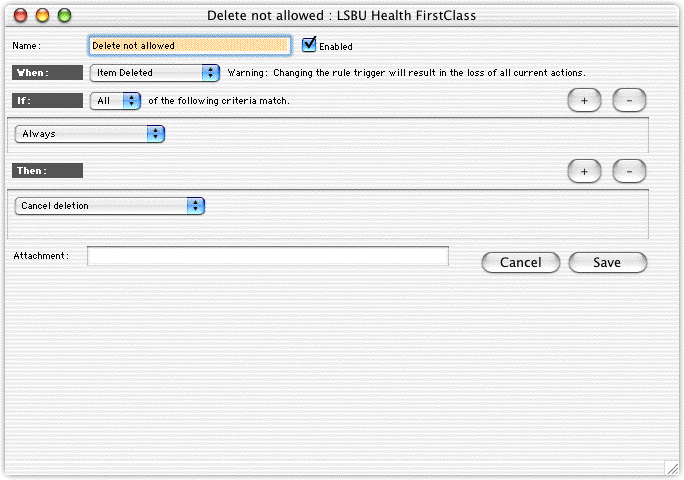
 Rule 8 Delete not allowed.
This rule stops the accidental deletion of any assignment. There is also a similar rule in the Copies conference.
 There are only two rules in the Copies conference: one to stop accidental deletions, and one to turn off the flag - just to keep things tidy.
Batch admin to the rescue for different campuses
We had students attend classes on two different campuses - some distance apart. The course they follow is the same, but it is run in two different locations by two different teaching teams. We had to duplicate the online submission system for the second campus, which we did with a batch admin export command. This batch script allowed a copy of the entire structure - conferences, folders, rules - to be duplicated for the second campus.
At the time of writing we are in the "teach the students how do do it" stage. It's all working well so far!
Admins helping admins
There are two other things that Nigel would really like to do, but he has not yet found a way to do them automatically:
• check to see if the name of an attachment follows a particular format
We have decided that because the attached assignments will be detached from the message that sent them we would need a way to distinguish to whom they belonged. So the attachment name must be in the format: student number - student name. It would be nice to check that this format (a seven digit number followed by some text) is correct.
• only allow one submission per student.
Can you help Nigel out? Do you have a solution to these problems? If you do, please send your solutions to TechNewsMail@firstclass.com (TechNewsMail conference) so we can forward them onto Nigel and publish them in the next newsletter.
In future issues...Certain features mentioned here may not yet be released, and may not be currently available in all geographic regions. Open Text Corporation reserves the right to modify or cancel any features mentioned here.
Next year, our first issue will focus primarily on FirstClass 8 features and functionality, so you can plan any upgrades or changes to your sites. Here are some of the other topics we are working on:
• Case study: Multi-language site
See how a customer successfully maintains multiple languages on a FirstClass site
• System maintenance practices
How to run and maintain a successful FirstClass site from a hardware perspective
• Examples of customer SMTP rules documents.
Tried and tested Internet Services SMTP mail rules.
We still want to hear from youShare your thoughts and ideas
Do you have additional knowledge to share? New information or handy tricks to reveal? Please send them to us. In addition, send us questions you want answered by developers and technical staff, suggestions for articles and content, queries about how to perform tasks that may make your job easier, and general comments about our newsletter.
Site visits
The Information Development team conducts site visits to gain feedback from administrators and users of FirstClass. Previous visits have proved successful, and were found to be mutually beneficial. If you would like to schedule a site visit at your company, send us an email (currently in the Greater Toronto area only*).
*If you are outside of the Greater Toronto Area, we can organize a teleconference so you can still take advantage of the benefits these meetings provide.
Please send all correspondence to the TechNewsMail conference (TechNewsMail@firstclass.com).
 Contact information Contact informationEditors: Ann Schwartz, Annette Ferron
TechNewsMail@firstclass.com (TechNewsMail conference)
sales@firstclass.com (Sales)
support@firstclass.com (FirstClass Customer Support)
Please send all correspondence to the TechNewsMail conference (TechNewsMail@firstclass.com).
Main number: 905.762.6000
Main fax number: 905.762.6151
Toll-free number: 1.888.588.3444
Our address is:
Open Text Corporation
FirstClass Division
38 Leek Crescent
Richmond Hill, ON
Canada, L4B 4N8
 Resources ResourcesDocumentation
Looking for new documentation? Existing documentation? Check out Documentation on our web site.
Check our online help for copies of the documentation that correspond to your server version.
Training
The Richmond Hill office holds customized training courses throughout the year. For a training schedule or course descriptions, including prerequisites, see Training on our web site. If you have any questions, please address them to FirstClass Training or training@firstclass.com.
 Archives ArchivesPrevious newsletters can be found at Welcome to The FirstClass Newsletter on our web site.
 Subscribing/Unsubscribing Subscribing/UnsubscribingWe want this newsletter to reach all of the people in your organization who will directly benefit from it. If you would like to subscribe anybody else to this newsletter, please provide us with their email address or FirstClass account. Enter SUBSCRIBE as the subject line.
If you would like to unsubscribe from this newsletter, send us an email with the subject line UNSUBSCRIBE.
Please send all correspondence to the TechNewsMail conference (TechNewsMail@firstclass.com).
 Copyright notice Copyright noticeInformation in this document is subject to change without notice. Certain features and products described in this document may not yet be released, and may not be currently available in all geographic regions.
All rights reserved. FirstClass is a registered trademark of Centrinity Inc. The FirstClass logo is a trademark of Centrinity Inc. All other trademarks are property of their respective owners.
This document is bound by international copyright law and the FirstClass Software License Agreement and Limited Warranty included with every FirstClass product.
Copyright 2003 by Open Text Corporation.
|